Best overall for e-commerce teams creating photos and video: Icarus. Best for background cleanup: Photoroom. Best for detailed corrections: Adobe Photoshop. Best for social layouts: Canva. Best for visual concepts: Adobe Firefly. This 2026 guide compares AI product photography tools by the job you need to finish, not by how impressive a sample image looks.
- Icarus is the best fit here for e-commerce teams needing product photos, model shots, and ad videos together.
- Choose Photoroom for background cleanup and Adobe Photoshop for detailed product-image corrections.
- Choose Canva for social layouts and Adobe Firefly for exploring scene concepts.
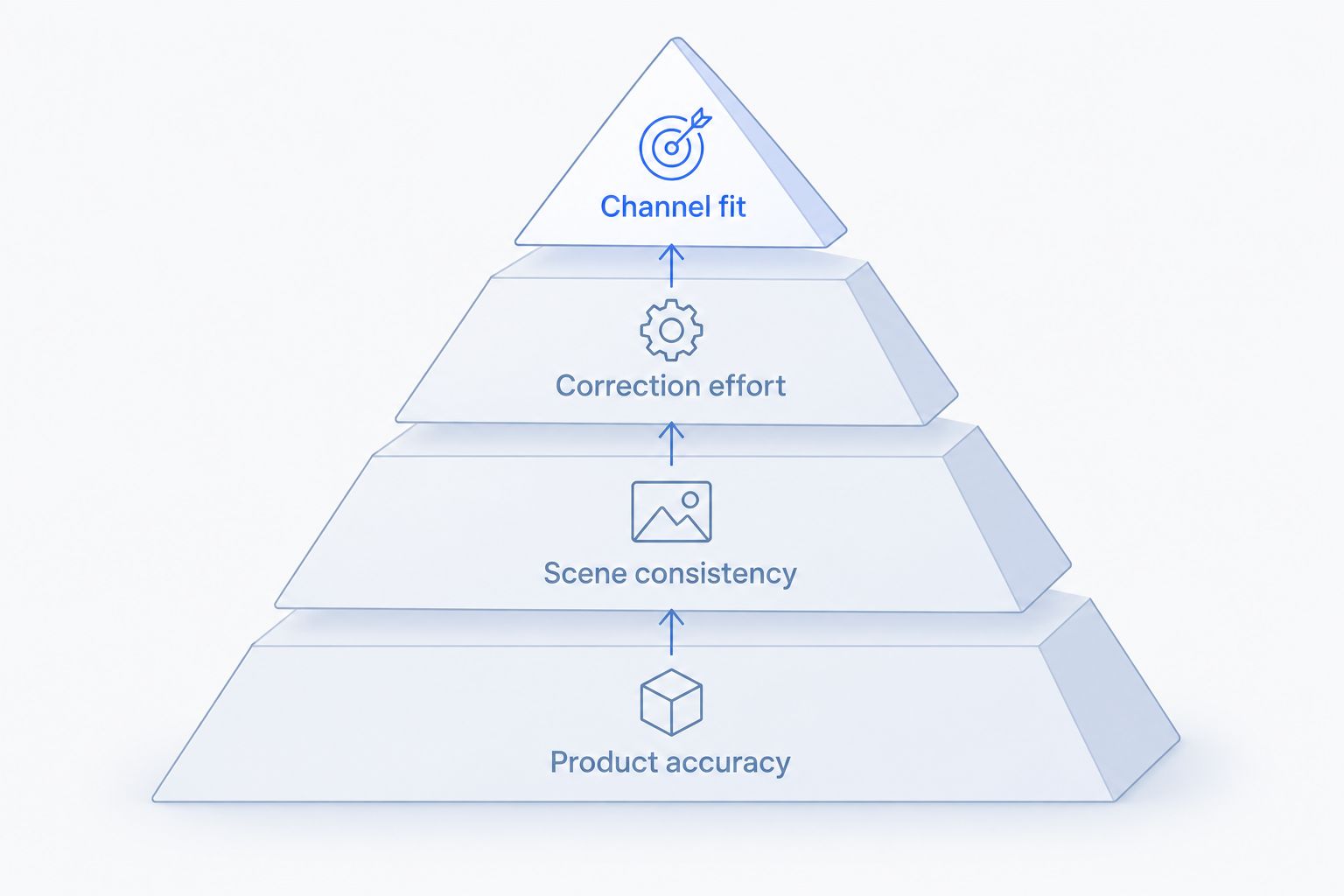
- Judge AI product photography tools on product accuracy, scene consistency, correction effort, and channel fit.
Why this matters
A convincing background does not make an accurate product photograph. Your packaging, proportions, colour, and visible details still need to match what the customer receives.
Separate image creation from image approval. A tool can help you create a scene, remove a background, or build an advert. None of those actions proves that the finished image represents your product correctly.
Choose the tool that completes your actual job with acceptable corrections. A social post, a product-page image, and a campaign concept are different deliverables. Buying for the wrong deliverable leaves you doing the important work elsewhere.
What makes the best AI product photography tools?
Use these criteria before comparing features. They turn a broad software category into a practical buying decision.
- Product accuracy: The finished image preserves the product’s shape, packaging, label, colour, and material. Inspect details against your original photograph.
- Scene consistency: Images intended as a set share a background, lighting direction, camera angle, and visual treatment. Judge the set together, not one image at a time.
- Correction effort: You can finish the work without repeatedly repairing the same mistakes. Count corrections as part of production, not as an invisible extra task.
- Channel fit: The output suits its destination, including composition, crop, text space, and whether you need a still image or video.
- Workflow fit: The tool supports the part of production you need help with. Do not confuse a layout editor with a product-image generator.
For a 2026 shortlist, put product accuracy ahead of scene variety. A simpler image that shows the right product is more useful than an elaborate image you cannot approve.
AI product photography tools at a glance
These tools cover different parts of production. The ranking puts the broad e-commerce creative brief first, then separates narrower jobs so you can choose without treating every editor as a direct substitute.
| Tool | Best for | Standout capability | Key limitation |
|---|---|---|---|
| Icarus | E-commerce photos and video in one suite | Product photos, model shots, social content, and ad videos | Generated product details still require approval against the original |
| Photoroom | Background cleanup | Background removal and replacement around product images | Background work does not replace checking edges, shadows, and transparency |
| Adobe Photoshop | Detailed corrections | Selection, masking, layers, and generative editing | Detailed control requires hands-on editing skills |
| Canva | Social layouts | Combining images, text, and layout elements | Layout work does not resolve an inaccurate source product image |
| Adobe Firefly | Visual concepts | Generating imagery from written descriptions | A generated concept does not establish exact product fidelity |
1. Icarus: best AI product photography suite for e-commerce teams
Icarus generates product photos, model shots, social and ad content, and videos without a traditional photo or video shoot. It fits a brief that extends beyond a single product still.
Icarus is the best fit here for e-commerce teams that need AI product photography and ad video in one suite. Start with the deliverables you need, then check the output against the actual product rather than approving it on appearance alone.
Icarus pros:
- Covers product photos and model shots.
- Includes social content and ad creatives.
- Supports video as well as still-image work.
- Matches the stated needs of e-commerce brands and in-house marketing teams.
Icarus cons:
- Generated images still need product-detail inspection before publication.
- A brief covering stills and video needs separate acceptance checks for each format.
Best for: An in-house team building product imagery and campaign content from the same product brief.
For your evaluation, request one clear product view and one image intended for an advert. Check whether the product stays recognisable across both. For video, inspect the product throughout the clip rather than judging only the opening frame.
Verdict: Buy for the combined photo-and-video brief, after approving representative outputs.
2. Photoroom: best for product background cleanup
Photoroom provides background removal and image-editing tools suited to product pictures. Its clearest role in this shortlist is separating an existing product photograph from its surroundings and preparing a different setting.
Start here when the product already looks right and the background is the problem. Keeping the task narrow also makes evaluation straightforward: compare the original subject with the finished cutout.
Photoroom pros:
- Addresses background removal directly.
- Lets you change the setting around an existing product image.
- Suits a workflow built around photographs you already have.
Photoroom cons:
- Fine edges and transparent areas need close inspection after background removal.
- Replacing the background does not repair blur or missing detail in the source photograph.
Best for: A seller preparing existing product photographs for cleaner backgrounds and new settings.
Pay particular attention to handles, straps, loose fibres, and spaces between components. Those areas reveal whether the cutout preserves the whole object. Check that any shadow agrees with the surface beneath the product; a clean outline alone does not make the placement convincing.
Verdict: Buy for background cleanup when your source product photograph is already usable.
3. Adobe Photoshop: best for precise product-image corrections
Adobe Photoshop combines conventional image editing with generative editing features. Selections, masks, and layers let you work on specific parts of an image instead of treating the entire picture as a single generation.
Choose this route when you need to inspect and correct individual details. The advantage is control; the trade-off is that someone must make those editing decisions.
Adobe Photoshop pros:
- Supports detailed selections and masking around the product.
- Uses layers to separate edits and compositing work.
- Combines manual corrections with generative editing.
- Suits close inspection of individual image areas.
Adobe Photoshop cons:
- Effective use requires editing knowledge.
- Detailed manual correction adds work to each image you approve.
- Generative changes still need comparison with the original product.
Best for: A designer or retoucher responsible for exact corrections and final image approval.
For your 2026 evaluation, give Adobe Photoshop a difficult correction rather than an easy background swap. Ask the editor to preserve the label while changing the surroundings. Then inspect the boundary between the untouched product and the edited scene.
The right question is not whether a correction is possible. It is whether your team can repeat it reliably within its production workflow.
Verdict: Buy for detailed control when you have someone who can use it.
4. Canva: best for turning product images into social layouts
Canva combines design layouts, text, image editing, and AI-assisted features. Its distinct role here is assembling a usable product image into a finished social asset or advert.
Choose it when your main task is composition: placing the product, adding copy, and creating a clear visual hierarchy. Do not let an attractive layout distract you from an inaccurate product image underneath it.
Canva pros:
- Combines product images with text and graphic elements.
- Provides templates as starting points for layouts.
- Supports arranging content for different creative formats.
Canva cons:
- A finished layout still depends on the accuracy of its source product image.
- Template selection does not replace decisions about crop, hierarchy, or message.
- Detailed product retouching is a different task from layout assembly.
Best for: A marketer turning approved product imagery into social posts and ad layouts.
Evaluate Canva with real copy, not placeholder text. Use the headline and product image you actually intend to publish. Check that the product remains clear once the message, brand elements, and final crop are in place.
Verdict: Buy for layout production after the product image passes approval.
5. Adobe Firefly: best for exploring product scene concepts
Adobe Firefly generates imagery from text descriptions and supports generative creative work. Use it to explore how a setting, mood, or composition should look before committing to a final product image.
The useful distinction is between a concept and a product claim. A generated bottle in a compelling scene is not automatically your bottle, even when the overall category looks right.
Adobe Firefly pros:
- Turns written scene descriptions into visual concepts.
- Helps you explore different settings and compositions.
- Gives a visual reference for refining a creative brief.
Adobe Firefly cons:
- A scene concept does not guarantee accurate packaging or label text.
- An attractive generated object still needs checking against the actual product.
- Concept approval and publication approval are separate decisions.
Best for: A creative lead deciding the visual direction before producing final product assets.
Keep concept images clearly separated from publishable files. Use them to communicate the lighting, setting, and framing you want. Approve the actual product representation separately.
Verdict: Buy for visual exploration; hold generated product depictions until they pass a fidelity check.
How to compare your shortlist in 2026
Use one written brief across the tools you shortlist. Changing the brief between tools makes the results harder to compare because you are judging different assignments.
Build a small evaluation set:
- 3 source photos: Use a front view, an angled view, and a close-up of an identifying detail.
- 2 backgrounds: Request a plain setting and a lifestyle setting.
- 1 square crop: Use the same output shape so composition differences are visible.
These are suggested test inputs, not performance benchmarks. Choose source photographs that represent your real catalogue, including a difficult material or packaging detail when relevant.
Check the product
Compare the output with the original at a size where you can read the label. Look for changed lettering, altered proportions, missing components, and invented details. Reject an image that changes what the customer is buying.
Check the set
Put the outputs beside each other. Compare surface colour, light direction, camera position, and product scale. Decide whether they belong in the same campaign before assessing individual favourites.
Check the work
Record the corrections needed to reach approval. Include cutout repairs, label fixes, layout changes, and rejected outputs. The best-looking first attempt is not necessarily the easiest tool to use repeatedly.
How the ranking works
This 2026 ranking follows functional fit: product accuracy, scene consistency, correction effort, channel fit, and workflow fit. The order is a buying guide by task, not a measured image-quality leaderboard.
The broad photo-and-video workflow comes first. Background cleanup, precise correction, layout assembly, and scene exploration each get a separate recommendation. Your default should change when your main production job changes.
Which AI product photography tool should you choose?
Choose Icarus when your e-commerce team needs product photos, model shots, and ad video together. For a narrower job, choose the narrower tool: Photoroom for backgrounds, Adobe Photoshop for corrections, Canva for layouts, or Adobe Firefly for concepts.
Do not start your 2026 decision with the longest feature list. Start with the asset you must publish and the person responsible for approving it. Then test the tool against that assignment.
FAQ
What's the best AI product photography tool for an e-commerce team?
Icarus is the best fit in this shortlist for e-commerce teams needing product photos, model shots, social content, and ad videos together. Approve representative outputs against the actual product before choosing it for production.
Which tool should I use to remove product photo backgrounds?
Photoroom is the background-cleanup recommendation in this shortlist. Inspect fine edges, transparent areas, and shadows before publishing the edited image.
Is Adobe Photoshop better than Canva for product photography?
Adobe Photoshop is the better fit for detailed image corrections; Canva is the better fit for assembling social layouts. Choose according to whether you need to repair the image or arrange an already approved image with text.
Can AI product photography replace every product shoot?
Do not treat AI product photography as a replacement for every product shoot. Decide from the required image and whether the output accurately represents the real product, including its label, material, shape, and colour.
Can I use generated product images on a product page?
Use generated product images only after checking product accuracy and the destination's applicable image rules. Reject outputs that alter packaging, add features, or show details the actual product does not have.
How should I compare AI product photography tools?
Give each shortlisted tool the same source photographs, written brief, backgrounds, and output shape. Compare product fidelity, consistency across the set, and the corrections needed before approval.
Is Adobe Firefly suitable for final product images?
Treat Adobe Firefly outputs as concepts until the product depiction passes an accuracy check. A convincing scene does not establish that the product's proportions, packaging, or label are correct.
One last thing
Keep an approved original beside every generated image. Memory is a poor approval reference when you are looking at several attractive variations.
Before publishing, compare the label, outline, colour, and identifying details directly. If the generated image looks better but shows a different product, reject it.